Set Up the Relationship Panel to Display Email Threads (Analytics)
Eclipse's, Analytics Email Threading technology is used to group together a timeline of related emails, allowing reviewers to understand the context and progression of an email conversation. The email threading component allows relationships among a family of emails to be identified, based on their content and associated metadata. Email families are emails that share a common starting email; an email thread represents a single branch of an email family and determines email order within a family.
Email threading can identify email families, missing messages within an email thread, and inclusive emails for email threads.
A combination of email headers and email body content is used to determine when emails belong to the same thread. Generally speaking, the algorithm is forgiving, to allow for the anomalies that can occur, such as timestamp differences generated by different servers. The determination of inclusiveness follows thread identification, and is much more exacting.

 Click
here to watch the Email Threading video
Click
here to watch the Email Threading video
|
|
Note: Email threading will typically be configured by your case administrator. For more information, contact your case administrator or see Configure Email Threading in IPRO Analytics in the Eclipse Administration section. |

Set Up the Relationship Panel to Display Email Threads
Use the threading results as a reference during review by setting up the Relationship panel to display Email Threads. This can also be used in conjunction with the other two methods.
-
After opening the case, navigate to Case Administration and select Relationships.
-
Review the list for an Email Threads panel. If it does not exist, create one by clicking on the Plus button and entering Email Threads in the Name field. If the panel does exist, ensure the panel is set up as described below:
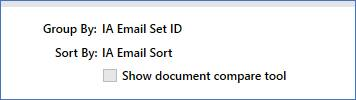
-
Under Group By, select the IA Email Set ID field or the equivalent field you created.
-
Under Sort By, select IA Email Sort field, or the equivalent field you created.
-
Under the Selected Fields section, add the following fields, at a minimum, to be displayed in your view.
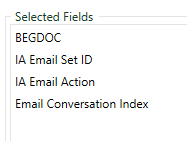
Set Up Email Thread Batch Review Options
Once Email Threading has been configured and the Email Threads panel has been enabled. You can review email threads in Review and setup of review batches as follows:
- Set Up Batch Review by Full Email Thread - This option allows you set up reviews such that a single reviewer reviewers all documents in the same email thread. This provides the opportunity for faster, more consistent review decisions. For more information see Create Full Email Thread Batches for Review (IPRO Analytics)
- Set Up Batch Review by Email Thread Excluding Documents Whose Text is Fully Contained Within Another Email. By excluding emails in a thread that are wholly contained within another email, you can greatly decrease the number of documents you must review and the total review time, while still allowing for review of all content in every document. For more information, see Create Inclusive Email Thread Batches for Review (IPRO Analytics).
Related Topics
Configure Email Threading in IPRO Analytics
Create Full Email Thread Batches for Review (IPRO Analytics)
Create Inclusive Email Thread Batches for Review (IPRO Analytics)
Create Email Thread with Near Duplicate Batches for Review (Analytics)